Expensify vs QuickBooks: Which One Do You Actually Need?
Expensify and QuickBooks solve different jobs. Expensify is expense management: employees submit spend, managers approve it, the company reimburses it. QuickBooks is full accounting: invoicing, payroll, bank feeds, and books that close at tax time. If you run team expenses, pick Expensify. If you keep books, pick QuickBooks. Many businesses run both, with Expensify feeding expenses into QuickBooks.
People line these two up as rivals, and that framing is the first thing to drop. Expensify and QuickBooks both touch receipts and both touch money, so they look like competitors. They are not. They are built for two different jobs, and the right answer depends entirely on which job you are trying to do.
Expensify is an expense-management platform: the loop where an employee or contractor spends money, submits it, a manager approves it, and the company reimburses it, often with corporate cards riding alongside. QuickBooks is a full accounting suite: invoicing, bank-feed reconciliation, payroll, and a general ledger that has to balance when the tax year closes. One moves expense reports through a team. The other keeps the books for the whole business.
So this is not a "which is better" question. It is a "which job comes first" question, and for plenty of businesses the honest answer is both. This guide covers what each one is genuinely good at, where each falls short, how they fit together, and a narrower case where neither is the right tool at all.
At a glance
These prices are current as of June 2026 and tend to move, so treat the source links at the bottom as the live numbers.
| Expensify | QuickBooks Online (Canada) | |
|---|---|---|
| Built for | Teams and corporate-card programs | Full accounting, invoicing, and payroll |
| Core job | Submit, approve, and reimburse expenses | Keep the books for the whole business |
| Entry price | $5 / member / month (Collect plan); Control tier costs more, USD | ~$22 CAD / month regular for EasyStart, the entry plan; intro discounts vary |
| Free tier | Mostly paid per member; limited free use | Free trial only |
| Tax-line categorization | Not built around Schedule C / T2125 lines (US expense management) | Full accounting that organizes for tax time, not a per-receipt T2125 line map |
| Built-in AI | Concierge automates expense tasks | Intuit Assist AI rolling out |
The split is clean. Expensify prices and structures itself around members and approval chains. QuickBooks prices and structures itself around running a complete set of books. The moment you know which of those describes your week, the choice mostly makes itself.
Where Expensify is genuinely better
Expensify wins the job it was built for, and it wins it convincingly. If money flows through other people on your behalf, this is the category Expensify owns.
The submit-approve-reimburse pipeline is the core strength. An employee photographs a receipt, it lands in an expense report, a manager approves it, and reimbursement follows. Expensify's Collect plan starts at $5 per member per month, and the Control tier adds more for larger programs. Corporate cards plug directly into that flow, so card spend and out-of-pocket spend land in the same place. Its Concierge feature automates expense tasks rather than answering questions about a pile of receipts, which is exactly what an approver wants: less manual report-chasing.
QuickBooks can record expenses, but it has no real concept of an employee submitting spend for someone else to approve and reimburse. If your actual problem is "five people keep buying things and I need to reimburse them cleanly," QuickBooks alone leaves you building that workflow by hand. Expensify is the purpose-built answer.
Where QuickBooks is genuinely better
QuickBooks wins the job it was built for just as clearly, and it is a bigger job. If you need real books, an expense platform will never get you there.
QuickBooks is a true accounting system. Bank-feed import pulls your transactions in automatically, reconciliation keeps the ledger honest, invoicing bills your clients, and payroll handles your people. At tax time it organizes everything into the categories your accountant or filing software expects. EasyStart, the Canadian entry plan, runs around $22 CAD a month at the regular rate, with intro discounts that vary. Intuit Assist, its AI layer, is rolling out across the product.
Expensify does none of that. It does not keep a general ledger, it does not reconcile a bank feed, and it does not invoice your clients. It hands expense data off to your accounting system rather than being one. So if the job is "I need books that balance and a clean handoff to tax filing," QuickBooks is the tool and Expensify is not a substitute for it.
It is worth being precise about one thing, since people often expect more here than either tool delivers: neither Expensify nor QuickBooks is built around per-receipt tax-line categorization. Expensify organizes spend for expense management, and QuickBooks organizes for accounting at the books level, not as a per-receipt map to a Schedule C or T2125 line. We get into why that gap matters for solo filers below.
Can you use both?
Yes, and this is the part the "versus" framing hides. Expensify and QuickBooks are not really alternatives. They are two layers of the same financial stack, and a large number of businesses run both on purpose.
The common setup: Expensify handles the front end, where staff submit spend and managers approve and reimburse it, and that approved data then flows into QuickBooks, where it lands in the books. Expensify is the expense pipeline, QuickBooks is the ledger. For a company with people who spend and books that need to close, that pairing covers both jobs without forcing either tool to do something it was not designed for.
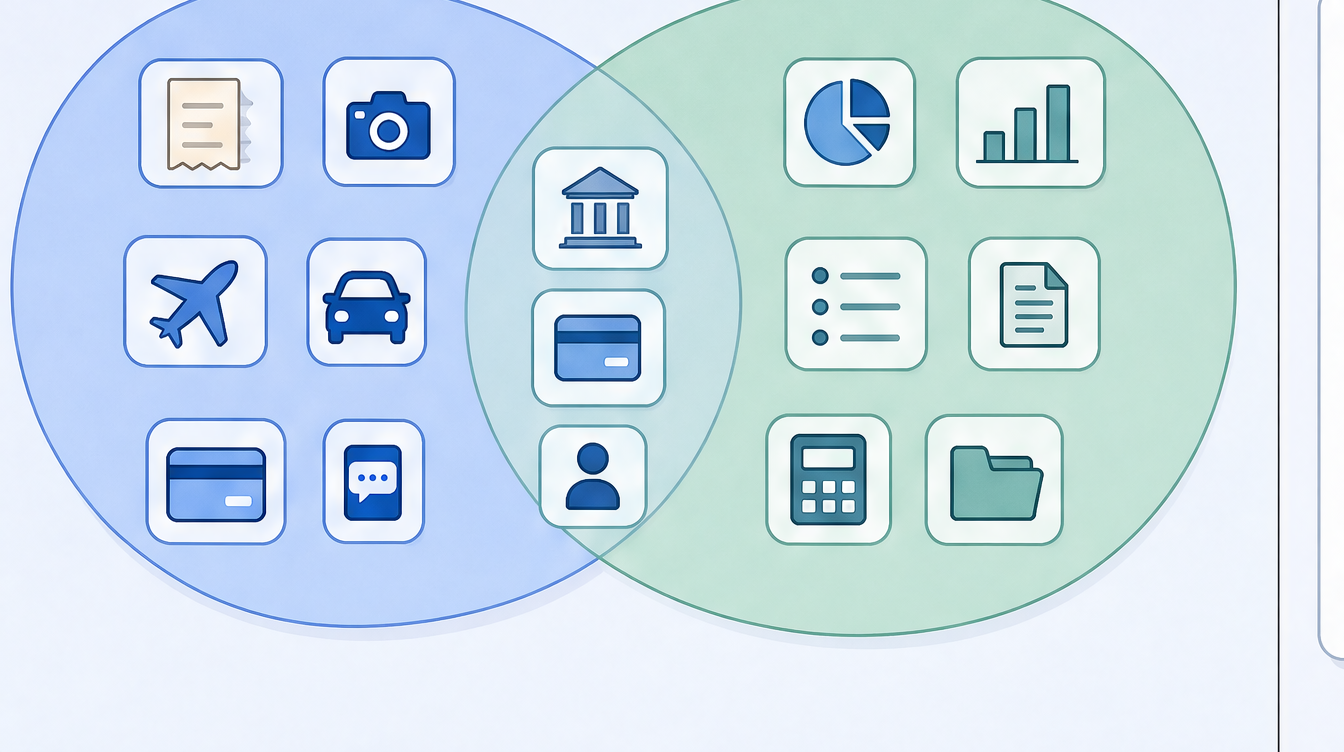
The overlap in that picture is small on purpose. The two tools share a thin strip (both touch receipts, both touch spend), and most of what each one does sits outside the other's circle. That is the whole reason pairing them works: they complement more than they compete.
A narrower case: the solo filer who just needs receipts sorted
There is a third kind of reader who lands on this comparison, and the binary does not serve them. They are not running team expenses, so the approval pipeline is wasted on them. They do not need a full ledger, payroll, or invoicing either. They are one freelancer or sole proprietor whose actual problem is small and specific: capture each receipt and get it categorized to the right tax line, so it is ready when they file a Schedule C in the US or a T2125 in Canada.
For that person, Expensify is too much in one direction and QuickBooks is too much in the other. An expense platform built for approvers and a full accounting suite are both more product, and more cost, than the job needs.
This is the narrow slot where a focused tool fits, and it is the one scan-ai is built for. It reads each line on a receipt, maps it to the matching US Schedule C or Canada T2125 line, and lets you ask plain-language questions about your own spending. Worth noting for the receipt job specifically: neither suite extracts the individual purchase lines off a receipt. Expensify's SmartScan and QuickBooks' receipt capture both stop at the header, the merchant, date, and total. It does not keep books, so it is not a QuickBooks replacement, and it does not run an approval pipeline, so it is not an Expensify replacement. It is the receipt-to-tax-category layer for one person, at a low price. If you are weighing options for that job, the best receipt app for freelancers in 2026 walks through the field, and the verified comparison below this article shows how it stacks up against both suites on price and scope, including what it does not do. (Any tax-category help here is illustrative, not tax advice.)
How this page was sourced
The numbers in the table came from each vendor's own pages in June 2026, read directly rather than from a summary or last year's pricing. Expensify's came from its Collect plan announcement and its pricing page; QuickBooks' came from Intuit's Canadian plans and the EasyStart page. Those links are listed in the comparison section under this article so you can check them yourself.
Pricing in this category changes often and varies by region and promotion. If a number here has drifted by the time you read it, the vendor's live page is the authority.
Who should pick which
Pick Expensify if you manage spend for other people. Employees or contractors submit expenses, someone approves them, the company reimburses, and corporate cards are in the mix. That is the job Expensify is built and priced for, and it does it well.
Pick QuickBooks if you need real books. You invoice clients, run payroll, want bank transactions pulled in and reconciled, and need everything organized for tax filing. That is a full accounting job, and QuickBooks is a full accounting suite. Expensify cannot stand in for it.
And if you are one person who mostly needs receipts captured and sorted into the right tax line, neither suite is really aimed at you. A smaller, focused tool will likely fit better and cost less.
Frequently asked questions
What is the difference between Expensify and QuickBooks? Expensify is an expense-management platform, built around employees submitting spend, managers approving it, and the company reimbursing it, with corporate cards in the loop. QuickBooks is a full accounting suite: invoicing, payroll, bank-feed reconciliation, and a general ledger. One runs expense reports through a team, the other keeps the books for the whole business.
Is Expensify cheaper than QuickBooks? They are priced for different things, so a straight comparison is misleading. Expensify's Collect plan starts at $5 per member per month, so cost scales with how many people you have. QuickBooks EasyStart in Canada runs around $22 CAD a month at the regular rate, regardless of headcount, with intro discounts that vary. A solo user might pay less with Expensify; a team might pay more. Prices are current as of June 2026 and change.
Can Expensify and QuickBooks work together? Yes. A common setup uses Expensify for the expense pipeline, where staff submit and managers approve spend, and feeds that approved data into QuickBooks, where it lands in the books. Many businesses run both for exactly that reason. Check each vendor's integration documentation for the current setup details.
Do I need QuickBooks if I already use Expensify? If you need to keep books (invoicing, payroll, bank reconciliation, a general ledger), then yes, because Expensify does not do those things. Expensify manages and reimburses expenses; it is not an accounting system. If your only need is expense management, Expensify alone may be enough.
Is Expensify an accounting program? No. Expensify manages expenses and reimbursements; it does not keep a general ledger or reconcile a bank feed. It hands expense data off to an accounting system rather than being one.
Does QuickBooks handle employee expense reports and reimbursement? QuickBooks can record expenses, but it has no built-in submit-approve-reimburse pipeline the way an expense platform does. If you need employees to submit spend for approval and reimbursement, that is the job Expensify is built for.
Do either of them map receipts to Schedule C or T2125 tax lines? Not as a per-receipt map. Expensify organizes spend for expense management, and QuickBooks organizes for accounting at the books level, not as a receipt-by-receipt categorization to a specific Schedule C or T2125 line. A solo filer who specifically wants that mapping may be better served by a focused receipt tool.
I am a solo freelancer. Which should I pick? Possibly neither. If you are not running team expenses and do not need full accounting, an expense platform and an accounting suite are both more than the job requires. For one person who mainly needs receipts captured and categorized for tax, a smaller, lower-cost tool tends to fit better. The comparison below this article lays out the options honestly.
Start with the job, not the brand
The honest takeaway: Expensify and QuickBooks are not competitors, they are two layers. Expensify runs the expense pipeline for a team. QuickBooks keeps the books for the business. Knowing which job you are solving first answers the question faster than any feature table, and for a lot of companies the real answer is both.
If you landed here as a solo filer who just needs receipts read and sorted to the right tax line, that is the narrow job scan-ai is built for, at a price kept deliberately low (which we explain in why we keep scan-ai cheap). Start free at scan-ai.ca: 20 receipt scans and 5 AI chats, no credit card. It will not keep your books or run an approval chain, but it will turn a pile of receipts into tax-ready records you can actually ask questions about.
This article is general information, not tax advice. Tax rules change and depend on your specific situation. Confirm anything with real stakes with a qualified accountant or tax professional.
How scan-ai compares
For one specific job, turning a pile of receipts into tax-ready, categorized records you can ask questions about, scan-ai is the cheapest option here and the one built around the Canadian T2125 and US Schedule C tax lines. It also reads every line on a receipt and gives each line its own tax category, on every plan, where the mass-market tools here (Expensify, QuickBooks, Wave, Shoeboxed) capture only the header total. Dext extracts lines too, but meters that feature and sells to firms. scan-ai starts free with 20 scans and no credit card, and tops out at $10/month for unlimited receipts.
| Tool | Entry price | Free tier | Line-item capture | T2125 / Schedule C tax lines | Ask-your-receipts chat | Built for |
|---|---|---|---|---|---|---|
| scan-ai | Free, then $3/mo (Starter) or $10/mo (Pro), USD | Yes. 20 receipt scans + 5 AI chats, no credit card | Yes. Reads every line on the receipt and gives each its own tax category, on every plan | Yes. Maps each receipt to US Schedule C and Canada T2125 lines | Yes. Ask your own receipts anything in plain language | One freelancer or self-employed person (US + Canada) |
| Expensify | $5 / member / month (Collect plan); Control tier costs more, USD | Mostly paid per member; limited free use | No. SmartScan captures the header: merchant, date, and amount | Not built around Schedule C / T2125 lines (US expense management) | Concierge automates expense tasks; not receipt Q&A | Teams and corporate-card programs |
| Dext (Receipt Bank) | Quote-based; practice plans priced per client, 10-client minimum | Free trial only | Yes, but metered. Line Item Extraction is automatic but spends per-document credits on firm plans | Captures and categorizes, then publishes to accounting software; not a sole-proprietor T2125 map | Not stated | Accounting and bookkeeping firms |
| Shoeboxed | $9 to $179 / month (Starter to Paper Plus), USD | No free plan (30-day money-back guarantee) | No. Captures header fields per receipt: vendor, total, date, and tax | Auto-tags expenses by tax category; T2125 / Schedule C line mapping not stated | Not stated | Receipt digitizing, including mail-in paper scanning |
| QuickBooks Online (Canada) | ~$22 CAD / month regular for EasyStart, the entry plan; intro discounts vary | Free trial only | No. Receipt capture pulls date, vendor, and total; splitting into lines is manual | Full accounting that organizes for tax time, not a per-receipt T2125 line map | Intuit Assist AI rolling out; not focused on receipt Q&A | Full accounting, invoicing, and payroll |
| Wave | Free; Pro $19 USD / $25 CAD per month. Receipt capture is an $11/mo add-on on the free plan | Yes, but receipt capture is a paid add-on or Pro-only | No. OCR fills date, amount, and category; no per-line breakdown | Bookkeeping categories; not built around T2125 / Schedule C lines | Not stated | Free accounting and invoicing |
The bigger suites do things scan-ai does not: bank-feed import, invoicing, and payroll. On mileage, scan-ai logs trips manually and applies the CRA and IRS standard rates, carrying the total onto T2125 line 9281 or the Schedule C vehicle line, but it does not detect trips automatically by GPS the way a dedicated tracker does. scan-ai stays focused on reading receipts, categorizing them to the right tax line, and answering questions about them, priced for one freelancer rather than a team. If you want a full accounting system, pair scan-ai with one or pick a suite. If you mainly need your receipts read, categorized, and searchable, scan-ai does that for less.
Sources, verified June 2026 (prices change; check each vendor)
- scan-ai: scan-ai pricing
- Expensify: Expensify: $5 Collect plan announcement; Expensify pricing; Expensify SmartScan: pulls merchant, date, amount
- Dext (Receipt Bank): Dext pricing (business); Dext plans for accountants and bookkeepers; Dext Line Item Extraction (credit-metered)
- Shoeboxed: Shoeboxed pricing; Shoeboxed: data captured per receipt
- QuickBooks Online (Canada): QuickBooks Online Canada plans and pricing; QuickBooks Online EasyStart (Canada); QuickBooks: receipt capture pulls date, vendor, total
- Wave: Wave pricing; Wave: scan and upload receipts (date, amount, category)